
A local Australian SMS trial reached roughly two-thirds of booked patients with mobile numbers and reduced the failure-to-attend rate from 23.4% to 14.2%, an absolute improvement of 9.2 percentage points among the intervention group. The result, published in the Medical Journal of Australia, gives practice managers a useful starting point: automated appointment reminders aren't merely a convenience for patients. They can change how reliably a clinic uses its rooms, clinicians and waiting list. The Australian outpatient SMS trial also shows why implementation details matter, including mobile reach, message timing and the patient groups most likely to respond.
For an Australian medical practice, the decision is not just whether to send texts. You need to choose when to contact patients, which channel to use, what patients can do from the message, how consent is recorded and how the results will be measured. The right system supports reception rather than creating another queue of exceptions.
Table of Contents
- What Missed Appointments Cost Australian Clinics
- What Automated Appointment Reminders Actually Do
- SMS, Email and Voice Compared for Patient Reach
- Timing and Cadence That Actually Works
- What the Australian Evidence Shows
- Privacy and Consent in Australia
- Rolling Out Reminders Without Disrupting the Practice
- Measuring Success and Choosing the Right Vendor
What Missed Appointments Cost Australian Clinics
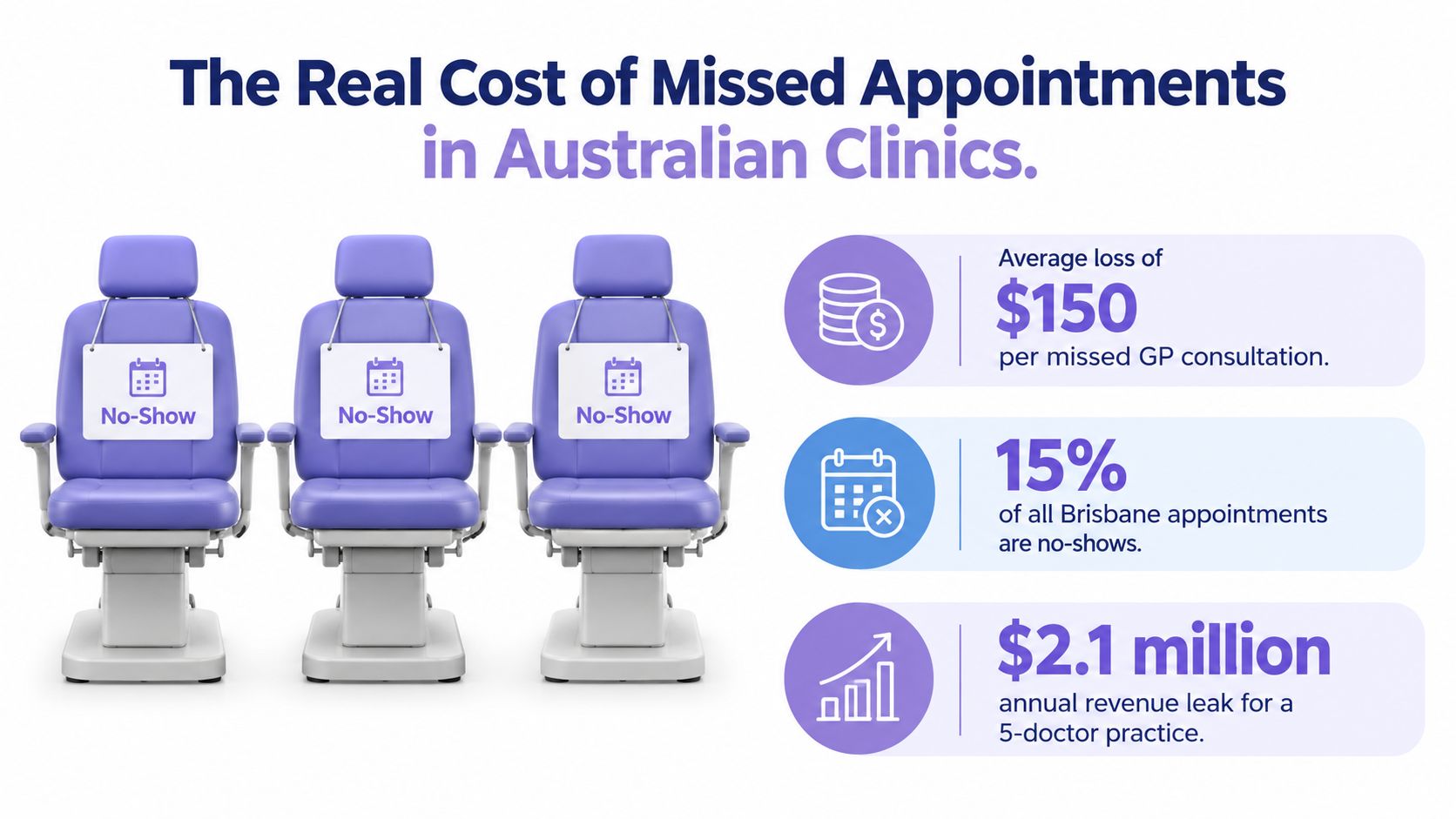
A NSW intervention at St Vincent's Hospital Sydney reported a 33.7% reduction in missed appointments, with each missed appointment costing hospitals between $125 and $800, depending on the circumstances, according to the published NSW intervention evidence. For a practice manager, those findings connect attendance with two practical concerns: protecting clinical capacity and preserving patient access.
At a busy suburban GP practice in Brisbane, three patients fail to attend on a Tuesday morning. Reception checks the waiting room, calls the patients, tries to bring later bookings forward and answers incoming calls at the same time. The practitioner has a long gap in the session, while patients who needed care remain in the queue.
The cost includes more than the consultation that did not happen. The room still carries operating costs, the clinician's time may not be reusable at short notice and reception must repair a schedule that should have remained productive. A missed appointment can also delay a review, result discussion or ongoing treatment.
Treat the empty slot as an operational problem
Start by tracing what happens after a patient does not arrive:
- Clinical capacity: Can the clinician see someone from a waitlist, complete useful administrative work or leave the time unused?
- Reception workload: How much time is spent calling, documenting the absence and rearranging the session?
- Patient access: Could another patient have used the appointment if cancellation notice had arrived earlier?
- Follow-up risk: Does the missed visit delay care or create another task for the practice?
Automated reminders address the preventable part of that chain. They cannot remove transport barriers, sudden illness or every communication failure. They can give patients a timely prompt and a straightforward way to cancel or reschedule before the slot is lost.
The operational choice is therefore broader than whether to send an SMS. A practice must decide how reminders fit its booking process, how staff handle replies and which patients need another contact method. Australian evidence can support the business case, but the practice still has to set timing, channel mix and compliance controls that suit its patients and workflow.
Practical rule: Measure an empty appointment through both lost capacity and staff recovery time. That creates a clearer business case than treating reminders as a minor messaging expense.
What Automated Appointment Reminders Actually Do
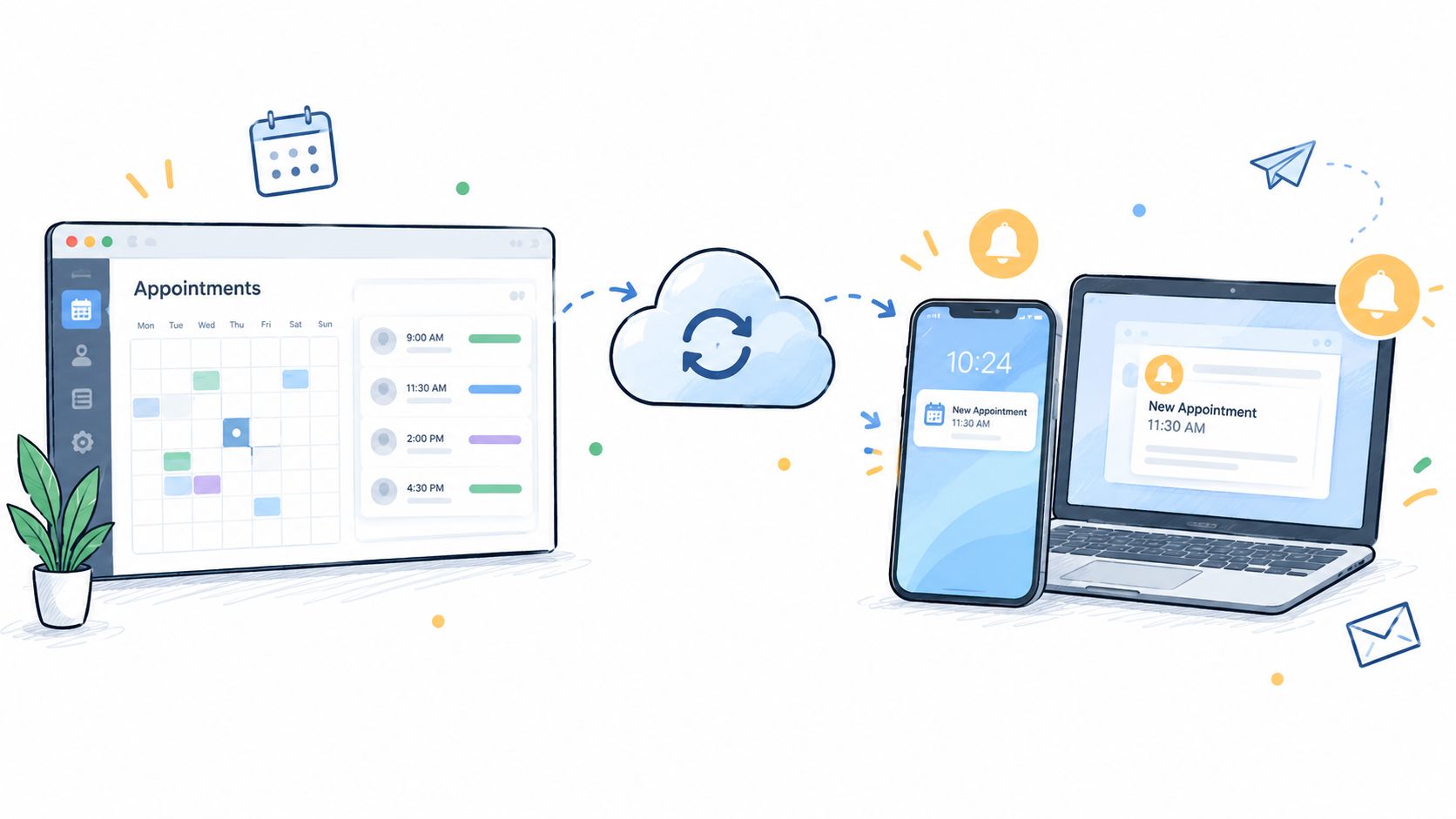
Automated appointment reminders are software workflows connected to a practice management system. When a booking is created or changed, the system reads the relevant appointment information, applies the clinic's timing rules and sends a confirmation or reminder through an approved channel.
The basic workflow is straightforward:
- A patient books, changes or cancels an appointment.
- The reminder service receives the updated booking details.
- It sends a scheduled message by SMS, email or voice.
- The patient confirms, cancels or requests a new time.
- The booking record or a staff task reflects that response.
That differs from a receptionist working through a list and calling patients one at a time. Manual calls depend on who is available, whether the list was completed and whether the patient answers. Automation acts like a dependable offsider handling the routine nudge, while the front desk deals with the patient standing at reception, the urgent call or the booking that needs judgement.
The useful features are operational, not flashy
A good reminder workflow should do more than broadcast a date and time. It should help the patient act without forcing reception to process every response manually.
- Two-way SMS: A patient can reply to confirm or ask for help.
- Confirmation links: A tap records attendance intent without a phone call.
- Cancellation handling: The practice can release the slot promptly.
- Rescheduling flows: The patient can select an available alternative where the system supports it.
- Waitlist offers: A newly released appointment can go to an eligible patient.
- Exception flags: Unconfirmed or failed messages can create a task for staff.
The system should also stop sending unnecessary reminders after a cancellation and preserve a clear record of changes. Those details determine whether automation reduces work or just moves it into an inbox.
SMS, Email and Voice Compared for Patient Reach
Channel choice should follow the patient and the appointment, not a vendor's default setting. SMS is usually the strongest first layer for a short, time-sensitive prompt. Email is better suited to instructions that need space, while voice remains valuable when the patient prefers a conversation or the booking is difficult to explain in a short message.
| Channel | Open or reach rate | Average cost per send | Best for | Limitations |
|---|---|---|---|---|
| SMS | Generally immediate and highly visible | Usually charged per message | Confirmations, cancellations and short reminders | Limited space and message costs |
| Variable, with messages sometimes delayed or filtered | Often lower than SMS | Preparation instructions, directions and detailed information | Can be missed, filtered or read late | |
| Voice | Depends on whether the patient answers | Higher staff or service cost | Older patients, complex bookings and escalation | No simple written trail unless documented |
A fasting blood test reminder illustrates the difference. SMS can tell the patient the appointment is approaching and direct them to detailed instructions. Email can carry preparation information, location details and what to bring. A voice call may be appropriate when the patient needs clarification or hasn't confirmed a complex booking.
Don't assume one channel works for every cohort. Capture communication preferences during registration, check that mobile numbers are current and offer an escalation path for people who don't use text messages. For practical ideas about wording and scheduling outside clinical contexts, cleaning appointment timing tips offer a useful comparison of how timing affects response.
Clinics reviewing their process can also compare their existing workflow with this guide to sending text message appointment reminders. The important question is whether the process records replies and updates the booking, rather than sending another message.
A sensible channel mix
Start with SMS as the primary reminder layer where the patient has consented and supplied a working mobile number. Add email when the appointment needs preparation or directions. Reserve voice for patients who prefer it, high-consequence bookings and unconfirmed appointments that justify staff attention.
This approach keeps the message proportionate. A routine follow-up doesn't need the same communication path as a procedural appointment, and a patient who has clearly chosen email shouldn't be forced into SMS.
Timing and Cadence That Actually Works
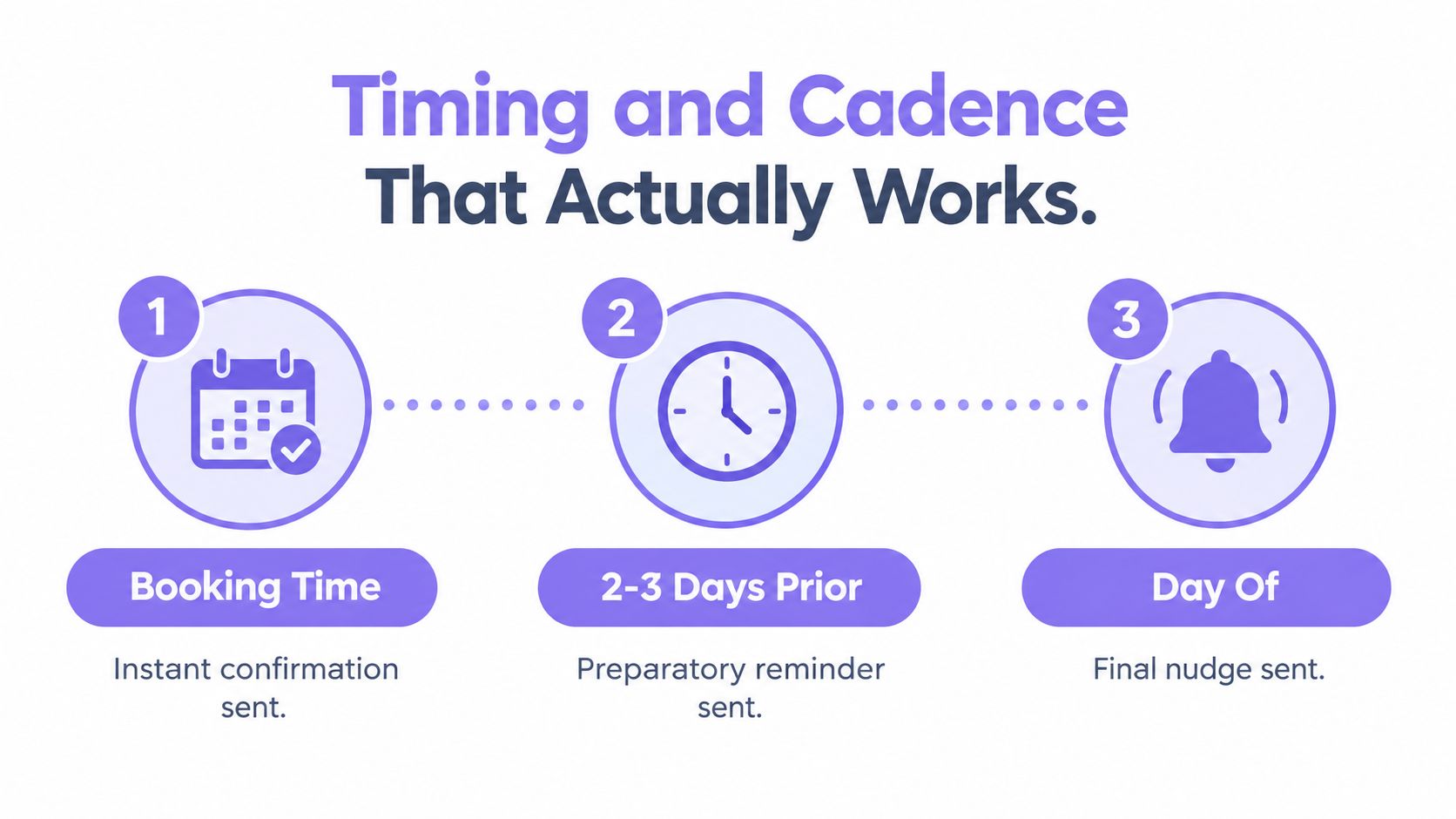
A useful reminder cadence has three jobs. The first message confirms that the booking exists, the second gives the patient time to act and the final message reduces the chance of a last-minute memory failure.
Use three distinct touchpoints
At booking, send an immediate confirmation with the date, time, location, practitioner and a clear option to cancel or reschedule. This catches data-entry errors while the booking is still fresh and gives the patient something to refer back to.
Two to three days before, send the practical reminder. This is the point at which a patient may realise that work, transport or another commitment conflicts with the appointment. If the message offers an easy change path, the clinic has a chance to reuse the slot.
On the day, send a short nudge around two to four hours before the appointment. A message sent the previous day may be too early for a patient who confirmed but then forgot. A same-day prompt should focus on arrival details rather than repeat every instruction.
Match the sequence to the booking
Routine GP consultations can usually follow the standard three-touch pattern. A new patient, fasting blood test or procedural booking may need an earlier preparation message because the patient has more to organise. The point isn't to send more notifications automatically. It's to give the patient the information needed at the moment it becomes useful.
Two-way replies make the cadence more valuable. A patient who confirms can be left alone. A patient who cancels can be offered another time, and a patient who doesn't respond can be flagged for a targeted call rather than receiving endless identical texts.
For telehealth, check the time zone attached to the appointment, especially when patients travel, providers work across locations or the practice serves people outside its usual area. A technically correct reminder sent at the wrong local time is still a poor patient experience.
Language preferences also belong in the workflow. Use approved templates for the languages your clinic supports, verify that dates and times are unambiguous and provide a phone option when the patient can't comfortably use the automated flow.
What the Australian Evidence Shows
In the Australian outpatient SMS trial, 64.2% of scheduled patients had a mobile number and received a reminder. The result shows why automated reminders need two measures: whether the clinic can reach patients, and whether the message changes attendance. The 2,151 patients in the intervention month had a 14.2% failure-to-attend rate, compared with 23.4% in the control group. Clinic-level results also varied, with rates of 12% to 16% with SMS versus 19% to 39% without it. The control group included 2,276 scheduled patients, and 65.1% had mobile contact numbers. The Medical Journal of Australia trial data shows both the reach limitation and the attendance effect.
For a practice manager, the operational questions are straightforward. Is the mobile number current? Does the reminder explain what the patient can do next, such as confirm, cancel or request a new appointment? A message that reaches the wrong number is like a letter sent to an old address. A message that offers no practical response still leaves reception to handle the problem manually.
The evidence is not limited to one outpatient setting. A behaviourally informed SMS intervention at St Vincent's Hospital Sydney reduced missed appointments by 33.7%, as reported in the NSW behavioural SMS intervention evidence. The Queensland evaluation produced a more mixed picture, with adult attendance increasing from 73.5 to 77.7 per 100 appointments, while children and adolescent services recorded a 4% attendance fall and a 20% rise in unauthorised or treatment non-attendance. The Queensland public dental services evaluation therefore supports testing by service, not assuming one result applies everywhere.
| Study or setting | Reminder approach | Reported attendance or no-show result |
|---|---|---|
| Australian outpatient clinics | SMS reminders | Failure-to-attend fell from 23.4% to 14.2%, a 9.2 percentage-point reduction, among the reported groups. MJA outpatient SMS trial |
| St Vincent's Hospital Sydney | Behaviourally informed SMS intervention | Missed appointments reduced by 33.7%. |
| Queensland public dental services | SMS reminders across service types | Adult attendance increased from 73.5 to 77.7 per 100 appointments. |
Use these findings to set a testable expectation. Compare attendance by practitioner, appointment type, lead time and patient group, then examine mobile-data quality, language needs, preparation requirements and the ease of rescheduling. Mixed results are a design warning, not a reason to abandon reminders.
Privacy and Consent in Australia
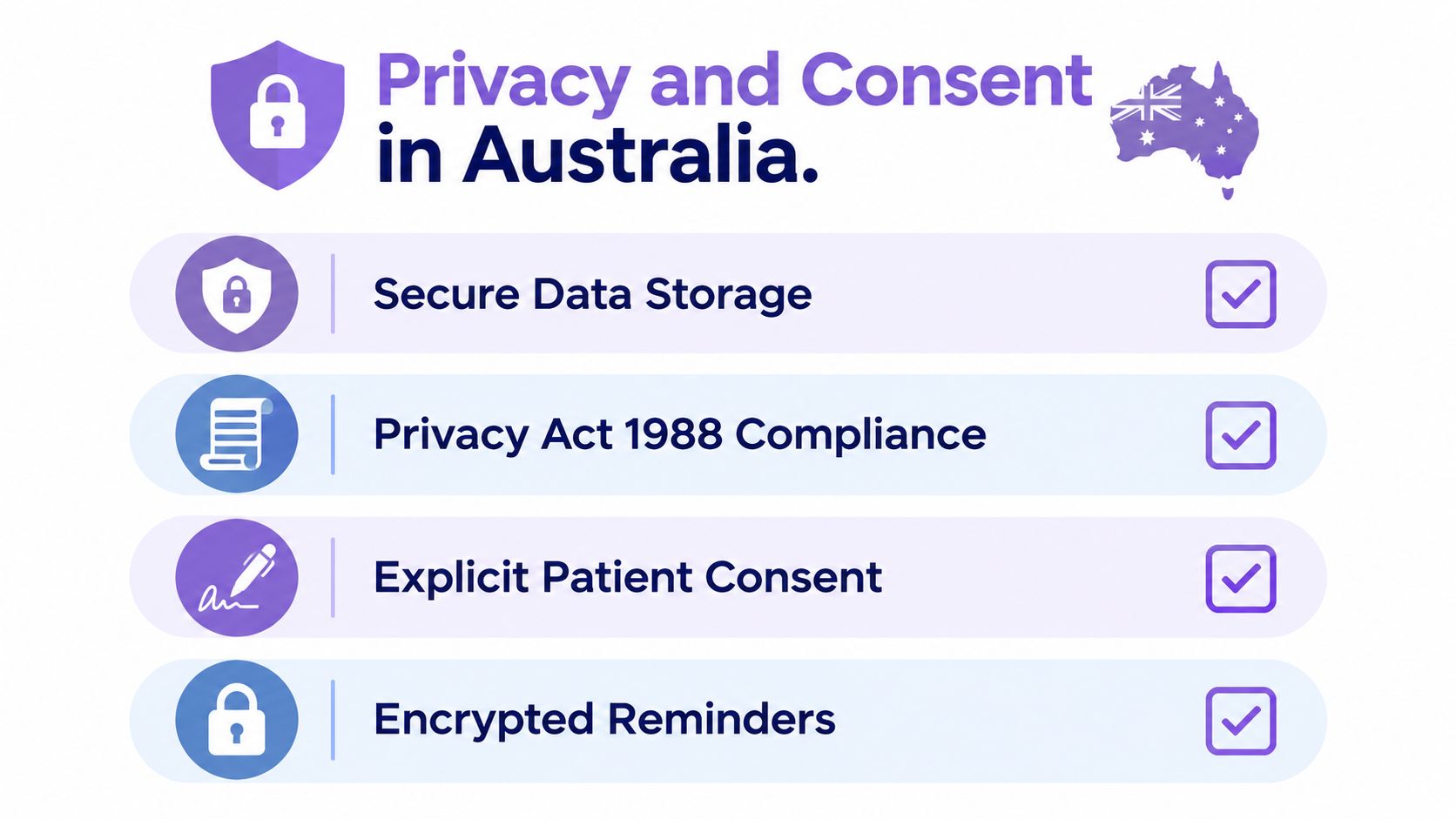
Privacy should be designed into the booking workflow, not added after the first message is sent. Under the Australian Privacy Act 1988 and Australian Privacy Principles, a practice should make its communication purpose clear, limit the information in each message and handle patient data through controlled systems.
Start at registration. Ask whether the patient agrees to appointment communications by SMS, email or voice, record the selected channels in the patient record and make the preference visible to staff. If a patient changes their mind, the practice needs a simple way to update the preference and prevent future messages that the patient no longer wants.
Keep reminders administrative
A generic message such as “You have an appointment at the clinic tomorrow” exposes less information than a message naming a condition or treatment. Include only the logistics the patient needs, such as the date, time, location and a safe way to contact the practice.
Avoid putting diagnoses, test results or detailed clinical instructions into ordinary SMS or email unless the communication method and privacy assessment support that use. Put sensitive information in an approved secure channel, and explain to staff why a short reminder should remain a short reminder.
Build a small compliance checklist
- Consent field: Record the patient's channel preference and the date or context in which consent was provided.
- Audit trail: Keep a record of changes, opt-outs, failed deliveries and staff overrides.
- Vendor controls: Confirm how the supplier stores, accesses and deletes patient information, and document the contractual safeguards.
- Template review: Have an authorised practice representative approve reminder wording before it goes live.
- Opt-out workflow: Tell staff what to do when a patient withdraws consent or requests another channel.
- Access limits: Give system access only to people who need it for booking and patient communication.
Practices should also understand the difference between an ordinary reminder and a secure clinical exchange. Secure messaging in healthcare provides useful context for deciding when a reminder is sufficient and when a protected communication method is more appropriate.
Rolling Out Reminders Without Disrupting the Practice
A reminder project should reduce front-desk work during the pilot, not create a second administrative system. Roll it out in controlled phases so the practice can identify data and workflow problems before every appointment is included.
Start with the current process
Audit the baseline. Review missed appointments by practitioner, appointment type, day and time. Record how reminders are currently sent, how many staff hours they consume and what happens when a patient cancels.
Check the integration. Confirm that the reminder service receives new bookings, cancellations, changes and patient contact details from the existing practice management software. Test whether consent flags travel with the patient record. A system that copies an appointment but loses the communication preference creates avoidable risk.
Pilot one stream. Choose one practitioner, service or appointment category for a limited trial. Use a cadence suited to that cohort, test message wording and give reception a clear procedure for failed messages and unusual replies.
Review before expansion. Compare attendance, confirmations, cancellations and staff workload with the baseline. Expand only after the clinic has corrected the problems found in the pilot.
Plan for the ordinary failures
Outdated mobile numbers are common operational obstacles. So are landlines entered as mobiles, incomplete country codes, duplicate patient records and bookings created outside the normal workflow. Validate contact details at each suitable patient interaction, but don't make reception responsible for manually checking every reminder.
Set sending restrictions that respect the practice's hours and patient expectations. Train staff on override procedures, including how to pause a message, correct a booking, handle a patient who replies with free text and escalate a patient who needs clinical advice.
A workflow platform such as healthcare workflow software can be assessed alongside other options, provided the practice tests integration, permissions and exception handling rather than relying on a feature list.
Measuring Success and Choosing the Right Vendor
A reminder rollout needs a baseline and a small set of measures that staff can understand. Track the no-show rate by practitioner and appointment type, confirmation rate, rebooking rate after cancellation and the time between the reminder and the scheduled appointment.
Don't judge performance from a single busy week. Compare like with like, separate new and returning patients, and identify whether a change in attendance came from better reach, better timing or easier rescheduling.
| KPI | Pre-rollout baseline | Target after 90 days |
|---|---|---|
| No-show rate | Record by practitioner, service and patient cohort | Demonstrable improvement against the clinic baseline |
| Confirmation rate | Record replies and link confirmations by channel | Increasing confirmation activity with fewer manual follow-ups |
| Rebooking after cancellation | Record released slots that are filled | More cancelled appointments converted into usable bookings |
| Reminder lead time | Record the interval between each message and appointment | Consistent delivery within the clinic's chosen cadence |
| Staff intervention | Record calls, tasks and exceptions created | Less routine manual work without missed exceptions |
Ask vendors operational questions
- Does the integration receive booking changes and cancellations in near real time?
- Are consent fields, preferences and opt-outs transferred reliably?
- Can the practice see an audit trail for messages, replies and overrides?
- Can templates differ by appointment type and language preference?
- Does a patient reply update the booking or create a task for staff?
- Where is patient data stored, and what contractual protections apply?
- Can the practice export its data and leave without losing the communication history?
- Can the vendor report outcomes by practitioner, service and channel?
Shortlist two or three suppliers, run a paid pilot and evaluate measured workflow outcomes. A lower message price isn't useful if staff still have to reconcile responses manually, while a feature-rich platform isn't suitable if it can't connect cleanly to the practice's existing systems.
TOOLii provides Australian medical practices with automation for appointments, patient communications and related administrative workflows, including reminder and follow-up capabilities through its Syncomatic platform. Visit TOOLii to discuss a reminder workflow that fits your practice management system, consent process and patient mix.