
Document automation software uses AI and OCR to capture, classify, and route medical documents into practice management systems within seconds, reducing processing time from minutes to under 15 seconds while ensuring compliance with Australian privacy laws. For an Australian clinic, the useful solution isn't a scanner with a modern interface, but a controlled workflow that matches each document to the right patient, preserves its meaning, and sends it where staff and clinicians need it.
The Tuesday morning rush makes the problem obvious. The phones are already ringing, patients are checking in, a referral has arrived by fax, pathology results are sitting in an email inbox, and someone at reception is opening scanned letters one by one to work out where they belong. A document automation platform can remove that repetitive handling, but only if it integrates properly with the systems your practice already relies on.
Table of Contents
- The Daily Document Chaos in Australian Clinics
- What Document Automation Software Actually Does
- Manual Filing Versus Automated Routing in Practice
- Australian Compliance and Security Requirements
- Measuring Return on Investment in Your Practice
- Implementation Checklist for Medical Practices
The Daily Document Chaos in Australian Clinics
At 8 am, reception rarely starts with a clean queue. The team inherits documents from the previous afternoon, overnight emails, scanned referrals, specialist correspondence and results that need to reach a doctor before the next consultation. A staff member opens each file, reads enough to identify the patient, searches the practice-management system, chooses a document type and files the item manually.
That sequence looks harmless when viewed as one letter. Across a busy day, it becomes a constant interruption. Staff switch between email, fax software, scanners, folders and the PMS, while clinicians wait for information that may already have arrived but hasn't yet reached the correct patient record. Patients feel the delay when a referral isn't visible during a booking call or a result has to be retrieved from an inbox rather than the clinical file.

Why digital volume changes the risk
Australia's digital health environment has grown far beyond isolated electronic filing. The Australian Government reported that, by April 2025, more than 24 million healthcare recipients had a My Health Record, and more than 99% of those records contained health data. The system held more than 1.7 billion documents, including clinical letters, pathology and diagnostic-imaging reports, medicines information, immunisation records and hospital discharge summaries. The Australian Government's Medicare monitoring report also recorded participation from 99% of Australian general practices, 99% of pharmacies and 97% of public hospitals.
Those figures don't mean every document enters a local PMS automatically. They show the scale of information that Australian healthcare organisations now create, exchange and retrieve. A small proportion requiring manual review still represents a substantial operational burden, particularly when the practice must identify the patient and preserve the context of the original document.
The Australian Institute of Health and Welfare reported that 96% of general practitioners used computers for clinical purposes in 2014–15, while 416 million clinical documents were uploaded during 2024 alone. The AIHW's primary health care reporting illustrates the shift from basic computerisation to connected, high-volume information exchange.
Practical rule: A document isn't safely automated when it has merely been converted into text. It has to arrive in the correct patient record, retain its source, and remain reviewable when the system isn't confident.
The operational problem is therefore more specific than “too much paperwork”. It's the repeated human effort needed to interpret, identify, route and verify information across systems. Good document automation software targets that chain without pretending that every exception can be handled without staff judgement.
What Document Automation Software Actually Does
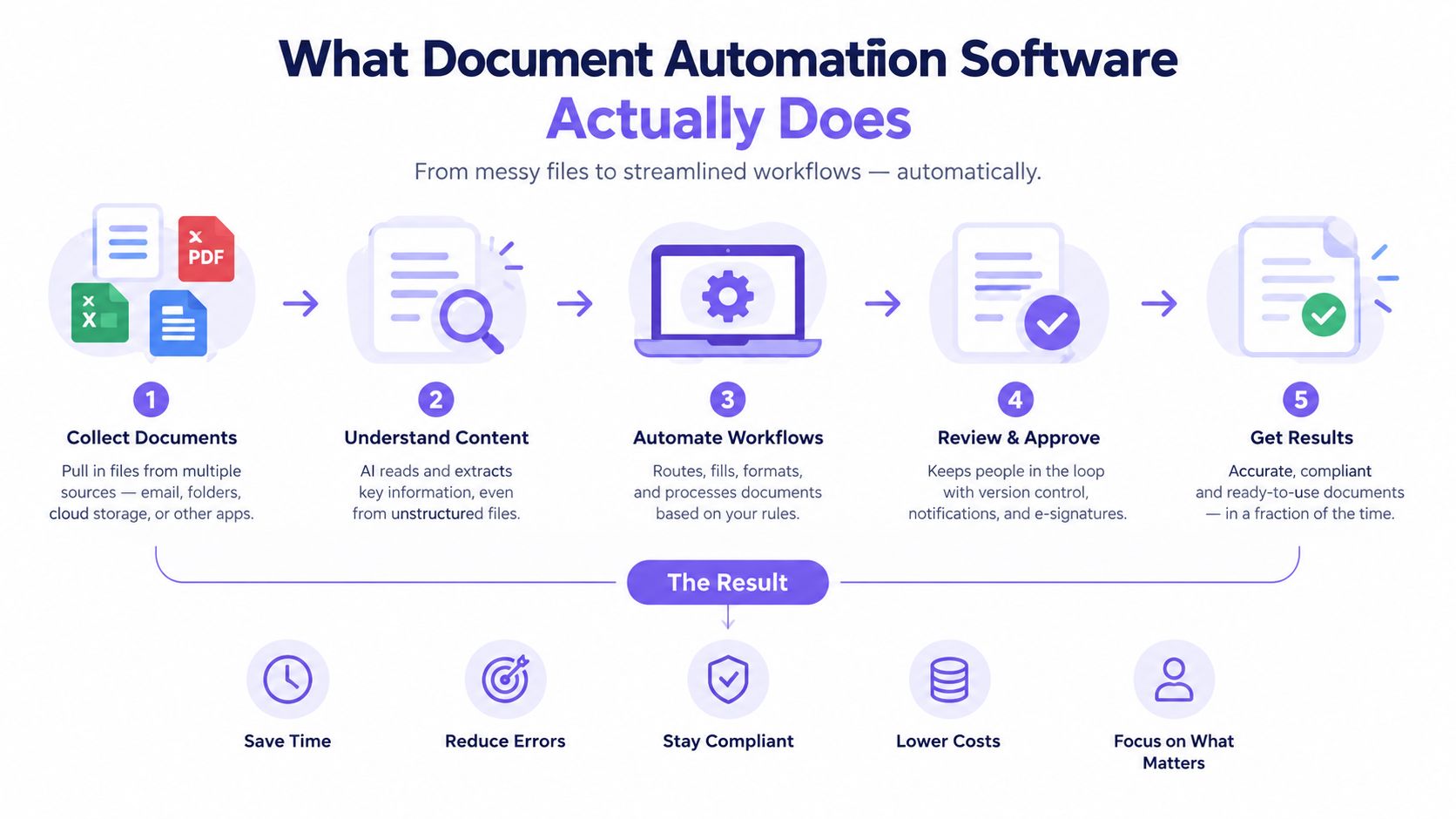
The useful distinction is between OCR and a complete document workflow. OCR turns an image or scanned page into machine-readable text. Document automation software adds classification, patient matching, validation, routing and integration, so the output can move into the practice's working system rather than becoming another file for someone to open.
A typical Australian clinic workflow has five connected stages:
- Capture receives an attachment, fax, scan, upload or other supported source. The platform should accept the formats your practice uses, not only documents uploaded through a demonstration screen.
- OCR and extraction identify text and relevant fields, such as patient name, date of birth, medical record number, document date and document category.
- Classification determines whether the file is a referral, pathology result, imaging report, specialist letter, discharge summary or another type of correspondence.
- Matching and validation compares the extracted identifiers with the patient records available in the PMS. Uncertain matches should be held for review rather than filed without visible confirmation.
- Routing and audit sends the document to the appropriate patient record, clinician inbox or work queue, while retaining a record of what happened.
Integration matters more than extraction
A platform that extracts a patient name accurately but leaves staff to copy it into Best Practice or MedicalDirector hasn't solved the main bottleneck. The value comes from preserving the relationship between the original document, the patient identity, the document type and the next action.
Look for stable identifiers, structured metadata, provenance and standards-based APIs where they're available. Screen scraping or uncontrolled file exchange can appear quick during implementation, but it creates fragile dependencies and makes corrections harder. The Australian Digital Health Agency describes interoperability as the ability to transfer the meaning of information between systems without special user effort. Its interoperability survey identifies fragmented systems, uneven uptake and workflow risks as continuing constraints.
The same principle applies when comparing a healthcare workflow platform with general automation tools. A broader overview of Ekipa AI workflow automation can help teams understand how intake, rules and downstream actions fit together, but a medical practice still needs to test the workflow against its PMS, consent requirements and clinical exception paths.
Document automation also needs a human route for uncertainty. A staff member should be able to inspect the original file, correct an incorrect match, reverse a filing decision and see who or what performed the action. A fast workflow that hides uncertainty creates a different administrative problem, one that may be discovered only when a clinician looks for a result in the wrong record.
The strongest systems don't ask staff to trust a black box. They make routine documents quick to process and exceptional documents easy to investigate.
Manual Filing Versus Automated Routing in Practice
Manual filing requires a person to open the document, identify the patient, determine the type, find the correct record and assign the next destination. That work is repetitive, but it also demands attention. A rushed staff member can select the wrong patient with a similar name, place a letter in the wrong inbox or leave a document unprocessed because the workflow doesn't make ownership clear.
Australian general-practice evidence gives the clearest comparison. In a RACGP-reported implementation, automated correspondence allocation reduced processing time for each letter from approximately 3 minutes to 10 seconds, an 18-fold reduction. For a clinic processing 200 letters per day, the same calculation represents approximately 9.7 staff-hours of theoretical handling time saved daily, before exceptions, review and escalation are included. The RACGP report on digital transformation in general practice connects the result to a real correspondence workflow rather than a laboratory demonstration.
| Metric | Manual Handling | Automated Processing |
|---|---|---|
| Opening and reviewing | Staff open every item and inspect it individually | Software reads incoming files and extracts relevant information |
| Patient identification | Staff search and select a record | The system proposes or applies a match using configured identifiers |
| Classification | Staff determine whether the item is a result, referral or letter | Software classifies routine document types |
| Routing | Staff assign the document to a record or inbox | Rules route it to the configured PMS destination |
| Exceptions | Errors may remain hidden until someone notices them | Low-confidence items can be sent to human review |
| Auditability | Evidence may be spread across folders and inboxes | Events can be logged against the workflow |
The time saving matters, but it isn't the only difference. Manual processing imposes a cognitive cost because staff must repeat the same identification decisions while handling interruptions. Automated routing reduces that load for predictable documents, allowing the team to spend its attention on ambiguous names, incomplete referrals and clinically important exceptions.
Where automation stops
Automation doesn't remove responsibility from the practice. Handwritten content, missing identifiers, duplicate patients, unusual layouts and documents containing multiple patients can all require review. The platform should make those cases visible, not force a confident-looking decision.
The right comparison isn't “people versus machines”. It's routine processing versus supervised exception handling. A practice can use healthcare workflow software to organise the broader process, but it should still define who reviews uncertain matches, how corrections are recorded and when a document must be escalated to a clinician.
The practical test: Send the platform the document that usually causes trouble, not a clean sample. If it can explain its match, preserve the original and route uncertainty clearly, it deserves further evaluation.
Australian Compliance and Security Requirements
Healthcare automation needs to be designed around privacy and clinical accountability from the beginning. Faster ingestion is not a benefit if the platform exposes patient information, removes the original document or files a result against the wrong person.
Information downloaded from My Health Record is generally governed by the Privacy Act 1988, relevant state or territory laws and professional obligations once it enters a local practice system. The Office of the Australian Information Commissioner guidance for health service providers sets out the need for reasonable safeguards against misuse, loss, unauthorised access, modification and disclosure.
Controls to verify before deployment
Ask the supplier to demonstrate each control in the actual workflow, not just list it on a security page.
- Access governance: Roles should limit who can view, edit, route and export clinical documents. Reception staff, practice managers, clinicians and external support users shouldn't automatically receive the same access.
- Encryption: Files and extracted data should be encrypted in transit and at rest. Confirm how transfers between the intake source, automation service and PMS are protected.
- Audit logging: The system should record receipt, matching, routing, review, correction and deletion events. Logs need to support investigation rather than show only that a document exists.
- Retention and destruction: Configure retention rules for source files, extracted data and temporary copies. The practice should know how information is securely destroyed or de-identified when it is no longer required.
- Patient matching: Require a clear threshold or review path for uncertain identity matches. Don't allow a missing identifier to become an unreviewed guess.
- Incident response: Establish what happens if a document is sent to the wrong destination, accessed improperly or lost during transfer.
Interoperability is part of compliance because meaning can be lost during a hand-off. The Australian Digital Health Agency's guidance points practices towards structured metadata, provenance and standards-based exchange, while its practice-management expectations include support for clinical documents in FHIR formats and consent at patient and document level when contributing information to My Health Record. Those requirements make integration quality a clinical concern, not only an IT preference.
A platform such as medical document management software should therefore be assessed against the complete information lifecycle. Check where the original is stored, how corrections work, whether staff can reverse a route, and which logs the practice can export during an incident or audit.
Security is a workflow property. Role-based access, audit trails and retention rules matter most at the moment a document is opened, matched, transferred or corrected.
Measuring Return on Investment in Your Practice
Practice managers shouldn't approve automation on the promise that it will “save time”. They should define the work being measured, record the current process and compare the same workflow after implementation. The most useful baseline is often operational rather than financial: how long documents wait, how much staff review them, how often someone corrects a filing decision and how much clinician time is spent searching.
The 2025 Australian small-business research provides a useful adoption context. It found that 51% of health-sector businesses used AI, while 32% had no plans to adopt it, the lowest adoption rate among the industries surveyed. At the same time, 47% of healthcare respondents viewed AI positively, particularly for reducing administration and improving efficiency. The BizCover survey on how health businesses are adapting to AI suggests that caution isn't the same as rejection. Buyers want a bounded use case with visible safeguards.
Build a narrow measurement plan
Start with one document stream, such as incoming correspondence or pathology reports. Record the baseline for a representative operating period, then compare:
- Turnaround time: Measure receipt to filing, and receipt to clinician availability.
- Handling effort: Record staff time spent opening, identifying, classifying and routing documents.
- Correction burden: Count wrong-patient matches, wrong document types, duplicate filing and manual rework.
- Review load: Track how many items require human intervention and why.
- Patient-facing delay: Note avoidable call-backs, delayed referral processing and requests to resend information.
- Safety exceptions: Record documents held because of uncertain identity, missing consent or incomplete information.
Don't convert every improvement into a dollar figure prematurely. A shorter queue may free reception capacity, reduce interruptions or give clinicians earlier access to results without creating a directly billed service. Those outcomes still matter, but the practice should label them accurately rather than present them as guaranteed revenue.
Independent Australian analysis found that 83% of surveyed healthcare organisations said AI investments had fallen short of ROI expectations, compared with 72% of Australian data and AI leaders overall. The Menza guide to measuring ROI accurately offers a useful general discipline for separating activity from outcome. For a clinic, that means measuring avoided handling, correction rates and review burden instead of counting processed files alone.

A pilot should have a named owner, a defined document type, a review process and a stop condition. If the system saves handling time but creates frequent matching corrections, the practice hasn't yet achieved a safe return. If it processes routine correspondence quickly while routing uncertain cases to staff, the team has evidence for a measured expansion.
More broadly, medical practice automation should be evaluated as a collection of targeted workflow changes, not a single transformation project. Document intake may be the first use case, while appointment handling, recalls or consultation preparation require separate baselines and safeguards.
Implementation Checklist for Medical Practices
A successful rollout starts with the practice's real document mix. Don't choose a platform because its demonstration uses clean, typed pages. Test referrals, faxed letters, scanned results, duplicate patient names, missing identifiers and documents that require clinician review.
Use this checklist before signing a contract:
- Integration: Confirm the supported connection to Best Practice, MedicalDirector or your existing PMS. Ask whether the system writes to the patient record, a clinician inbox or both.
- Workflow ownership: Name the person responsible for document rules, exception review and correction procedures.
- Security evidence: Verify encryption, role-based access, audit logs, retention settings and breach-response responsibilities.
- Original files: Confirm that staff can retrieve the original document and see the source behind extracted fields.
- Human review: Test what happens when patient matching or classification is uncertain. The system should pause or escalate rather than make an invisible guess.
- Staff training: Train reception and administration teams on normal processing, corrections, escalation and downtime procedures.
- Pilot scope: Start with one document category and a clearly defined group of users. Keep a record of processing time, corrections and exceptions.
- Success measures: Agree on the baseline and review it with the people who handle documents daily. Include safety and quality measures, not only speed.
The RACGP implementation result gives practices a useful benchmark for the kind of operational change a well-designed workflow can produce, but it isn't a promise for every clinic. Your result will depend on document variety, PMS connectivity, matching quality, exception handling and staff adoption.

Choose the workflow first and the software second. A narrow, auditable pilot gives a practice stronger evidence than a broad rollout based on a polished demo.
TOOLii provides medical document upload and OCR that captures incoming files from sources such as email attachments, faxes, scanners and uploads, then organises them into patient records in Best Practice, with related tools for secure file transfer and wider clinic workflows. Visit TOOLii to assess whether its Australian healthcare automation approach fits your document-routing pilot.