
Most advice about secure file transfer methods starts with the protocol name. That's the wrong starting point. A clinic doesn't fail because someone chose the wrong acronym, it fails when the workflow lets the wrong person open the file, keeps access alive too long, or leaves no clean audit trail.
Australian healthcare has already shown why this matters. The OAIC recorded 527 notifications in the first half of 2024, the highest six-month total since July to December 2020, and 67% involved malicious or criminal attacks, while health service providers made up 19% of all reported breaches in that period (OAIC report on the highest number of data breaches in 3.5 years). In that environment, an encrypted file that lands in the wrong inbox is still a problem. Ordinary email attachments and shared folders can add more exposure through misaddressing, forwarding, and duplicate files that sit around long after the transfer is forgotten.
| Method | Best fit in clinic life | Weak point |
|---|---|---|
| SFTP | Scheduled bulk sends, lab and imaging drops | Awkward for named-recipient review |
| Secure portals | One-off specialist referrals | Recipient friction can slow adoption |
| Encrypted email | Simple low-friction exchange | Harder to control forwarding and expiry |
| HIE/APIs | System-to-system exchange | Integration effort is higher |
| HTTPS / FTPS | Controlled uploads and legacy exchange | Governance depends on the vendor setup |
| End-to-end encrypted services | Controlled shared workflows | Audit and PMS fit vary widely |
A protocol can be technically sound and still be operationally weak. In clinics, the question is whether the method controls who receives it, who can open it, how long it stays available, and what record exists after delivery. If it can't answer those questions, it's not secure enough for patient documents.
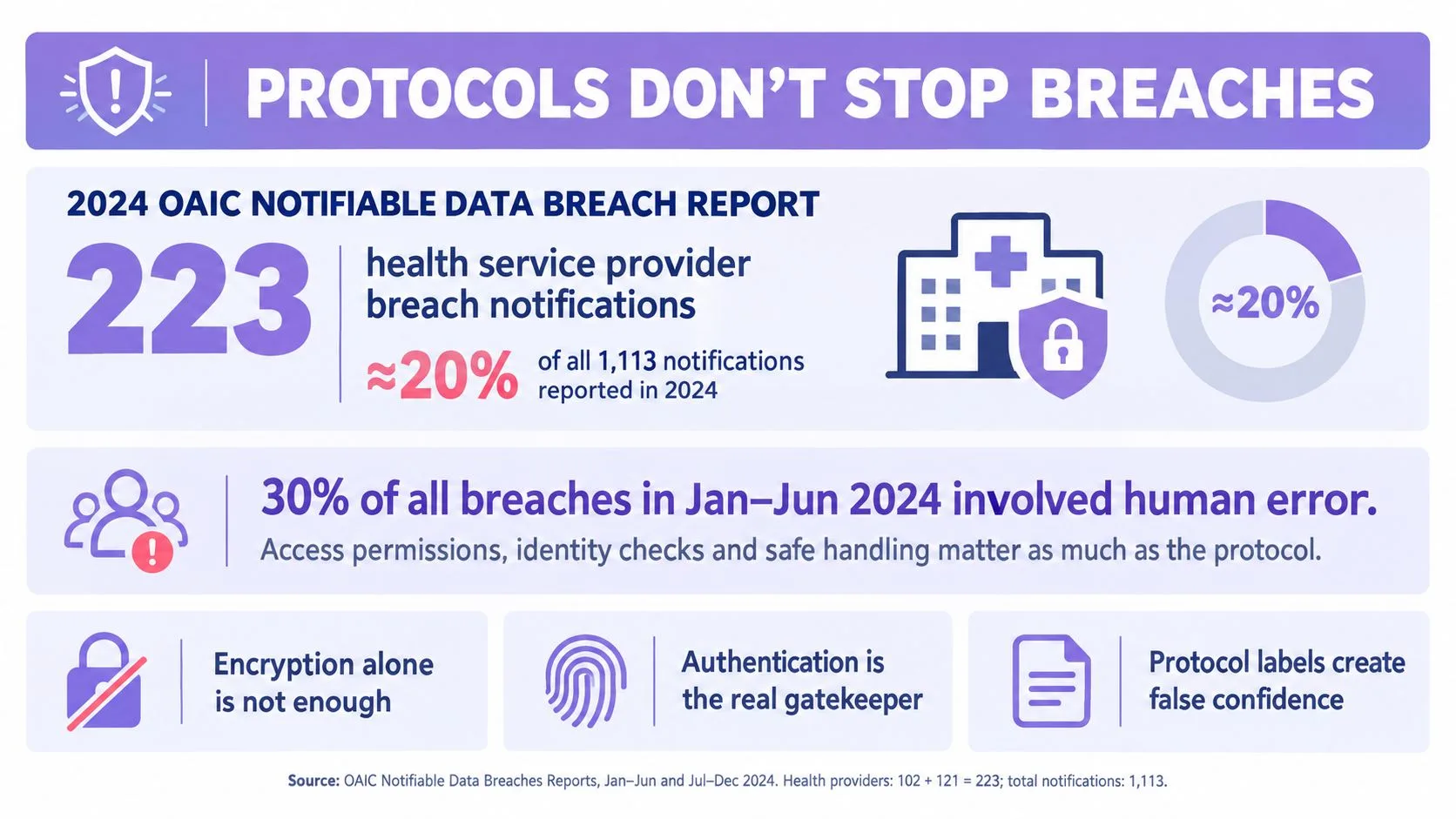
Table of Contents
- Why Protocol Labels Do Not Make a Transfer Secure
- What a Secure Transfer Workflow Actually Requires
- The Six Transfer Methods Australian Clinics Can Choose From
- Comparing the Six Methods Side by Side
- Matching the Right Method to Each Clinic Scenario
- Compliance Checklist for Australian Health Data Transfers
- Why Automation and Traceability Beat Protocol Snobbery
- Common Questions Australian Practice Managers Ask About File Transfer
Why Protocol Labels Do Not Make a Transfer Secure
The label on the tin is not the control. SFTP, TLS, HTTPS, and similar protocols describe how data moves, not whether the clinic has governed access properly. Australian privacy settings make that distinction obvious, because a transfer can be encrypted and still be mishandled by the sender, the recipient, or the practice team that stores the copy afterwards.
The OAIC's 2024 breach picture makes the point bluntly. The health sector remained heavily exposed, and the same reporting cycle included the MediSecure incident, which affected approximately 12.9 million Australians and was the largest breach by affected Australians since the scheme began (OAIC report). Encryption does not stop a recipient from forwarding a file to the wrong person, nor does it stop a shared folder from leaving duplicate copies lying around forever.
The weak point is usually the workflow
If a transfer method lets staff send to a generic inbox, reuse a link indefinitely, or skip recipient confirmation, the method is too loose. That's why I treat recipient verification, access expiry, and audit records as first-class controls, not optional extras.
A secure transfer is the one that ends cleanly, not the one that just starts encrypted.
The Australian position is also practical, not theoretical. The same OAIC material notes that clarification of Australian Privacy Principle 11 would explicitly point to safeguards like encrypting data, securing access to systems and premises, and training staff. That is a workflow view, not a protocol view. If your process can't show who sent the file, who accepted it, and when access ended, then the transfer may be encrypted but it still isn't well controlled.
If you want a simple decision rule, use this one. Never buy a transfer method for its acronym. Buy it for its control points.
For practices that want a workflow baseline rather than another inbox, TOOLii's secure file sharing for business is one example of a controlled exchange layer worth comparing against your current process.
What a Secure Transfer Workflow Actually Requires
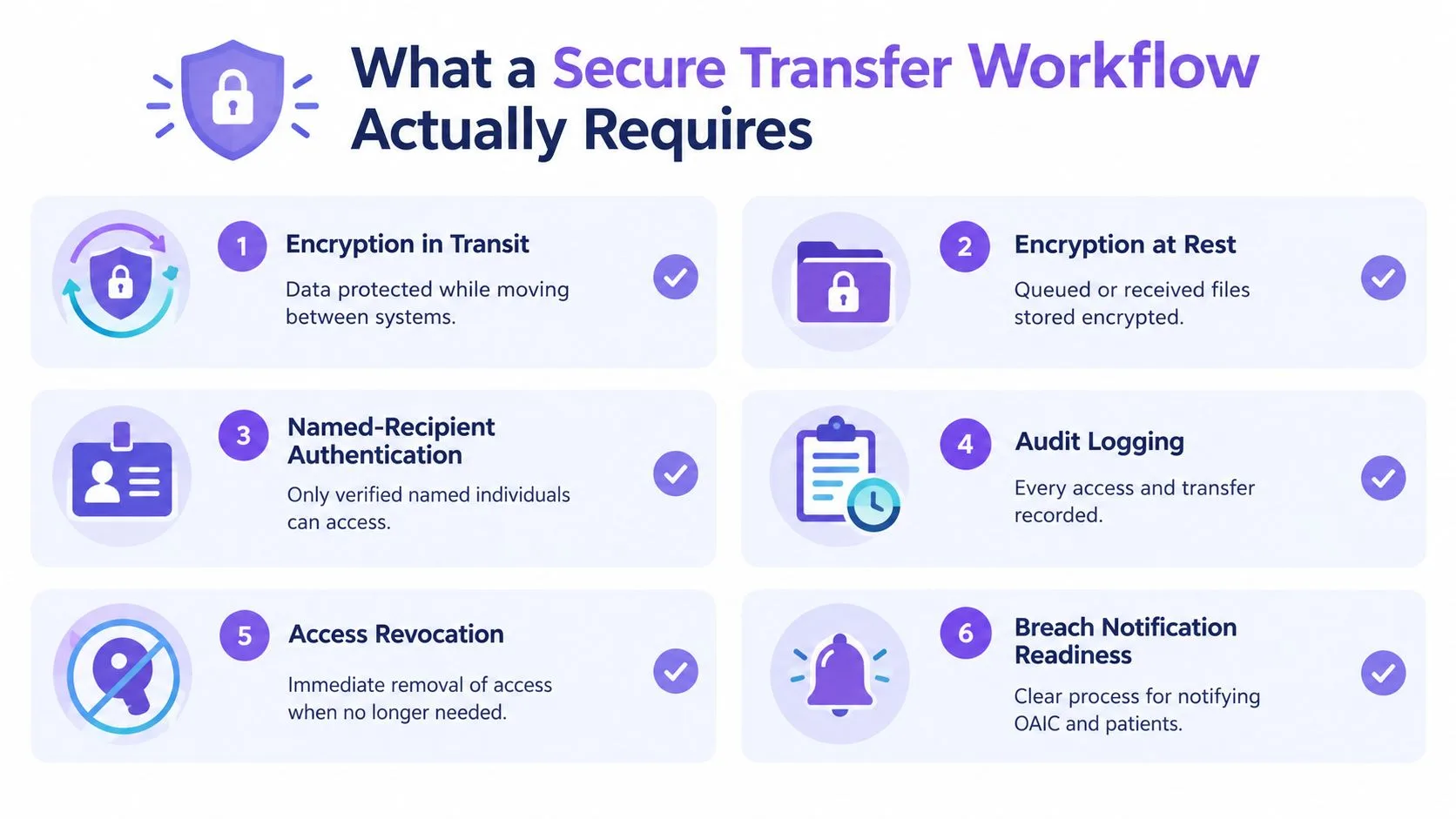
A secure workflow starts with encryption in transit, but that's only one piece. Files also need encryption at rest if they sit in a queue or a recipient inbox before download. A transfer method that protects the network path but leaves the stored copy loose is only half doing its job.
The non-negotiables
For Australian clinics, I'd insist on six controls before I'd trust a vendor or internal tool:
- Named-recipient authentication, so the file goes to a verified person or system, not a vague address.
- Multi-factor authentication, especially where patient documents can be accessed outside the core practice network.
- Least-privilege access with expiry, so access ends when the task ends.
- Immutable audit logging, so you can prove what happened after the fact.
- Encryption at rest, for queued, downloaded, or cached files.
- Breach-response readiness, because the workflow should already know how to contain and review a bad transfer.
The My Health Record model shows why identity and authorisation matter as much as transport. The system has more than 24 million healthcare recipients, over 99% of records contain health data, and more than 1.7 billion documents have been uploaded by consumers or providers, with coverage reaching 99% of general practices, 99% of pharmacies, and 97% of public hospitals (Australian Government consultation paper on My Health Record legislative instruments). That scale only works because identity, access, and traceability are built into the exchange model.
What to demand from a vendor
NSW Health strongly recommends secure file-transfer tools for personal health information because they support large files, encryption, recipient authentication, and authenticated access before download. ACT Health adds authorised disclosure, recipient verification, protective security markings, and Australian Government-sponsored secure transfer when direct access isn't available (NSW Health privacy section 9). That's the practical bar.
If a product can't show who accessed what, when, and for how long, don't adopt it. If it can't revoke access quickly, don't adopt it. If it can't support MFA, don't adopt it.
The Six Transfer Methods Australian Clinics Can Choose From
SFTP
SFTP works well when a clinic or lab needs scheduled bulk delivery. It fits nightly referral packs, pathology batches, and other file drops where the recipient system already knows where to look. Its strength is predictability, but it can be clumsy when humans need to verify each recipient or when the next step depends on a practice manager opening and checking the file.
HTTPS and FTPS
These are useful when a recipient needs a controlled upload or download path and the provider wants to keep the experience browser-friendly. In practice, they suit one-off submissions, document portals, and some legacy exchange setups. The trade-off is that governance lives in the implementation, so if the portal is weak on expiry, logs, or user management, the secure label doesn't save it.
Encrypted email
Encrypted email wins on familiarity and speed. Staff already know how to send it, which is exactly why it gets overused. It works for low-friction exchange, but it becomes a poor choice when you need strong recipient verification, good traceability, or tight control over forwarding and retention.
Secure web portals
Portals are better when you want named users, download tracking, and access expiry in one place. They suit specialist referrals and controlled document handoff where the recipient can log in without much training. The downside is recipient friction, because every extra login step increases the chance that staff will look for an easier workaround.
HIEs and APIs
These are the right tools for system-to-system exchange. They suit hospital links, practice-management integrations, and workflows where the destination should be a patient record rather than a person's inbox. With a sound integration, you get the cleanest traceability and the least manual handling.
End-to-end encrypted file-transfer services
These are best when the clinic wants a managed exchange layer rather than a transport-only tool. They can combine authentication, controlled access, and delivery tracking in a more user-friendly package. The catch is that not every service integrates cleanly with the practice management system, so you still need to test the handoff into the clinical record.
If you're assessing options for a multi-site setup, TOOLii's secure file transfer portal is one of the formats worth comparing against your actual workflow, not just your IT preferences.
Comparing the Six Methods Side by Side
| Method | Encryption in transit | Recipient verification | Audit trail | Expiry and revocation | Large file support | PMS integration |
|---|---|---|---|---|---|---|
| SFTP | Strong | Limited unless wrapped in workflow controls | Good at server level | Possible, but not native in many setups | Strong | Medium to high effort |
| HTTPS / FTPS | Strong | Moderate, depends on portal design | Moderate | Moderate | Good | Medium effort |
| Encrypted email | Moderate to strong | Weak to moderate | Weak | Weak | Poor | Low effort, low control |
| Secure web portals | Strong | Strong | Strong | Strong | Good | Medium effort |
| HIE / APIs | Strong | Strong | Strong | Strong | Varies by design | High effort |
| End-to-end encrypted services | Strong | Moderate to strong | Moderate to strong | Moderate to strong | Good | Varies widely |
The useful comparison is the complete workflow, not the encryption label. Encrypted email can protect a message in transit while still offering weak audit, expiry, and recipient-side control. It is easy to adopt, but that convenience leaves more work for clinic staff and fewer records for later review.
SFTP handles bulk exchange well and suits technical workflows, yet it normally needs additional controls for recipient verification, expiry, and clinical filing. HTTPS or FTPS offers a practical middle ground, with file capacity and moderate integration effort, but its audit quality depends on the portal design. Secure web portals score better for named access, tracking, and revocation, while HIEs and APIs provide the strongest route into connected clinical systems at a higher implementation cost.
End-to-end encrypted services sit between these options. They can combine controlled access with delivery tracking, but integration quality varies widely. Assess the handoff into the PMS before approving one for a multi-site clinic.
Two methods can both say “encrypted” and still land at opposite ends of the audit column. Read the row, not the label.
For a deeper comparison of platform features, see TOOLii's guide to the best secure file sharing options. Test each method against four operational questions: can staff verify the recipient, prove delivery, restrict access after sending, and file the document without manual re-keying? The method that performs well across all four usually deserves priority over the one with the strongest protocol name.
Matching the Right Method to Each Clinic Scenario
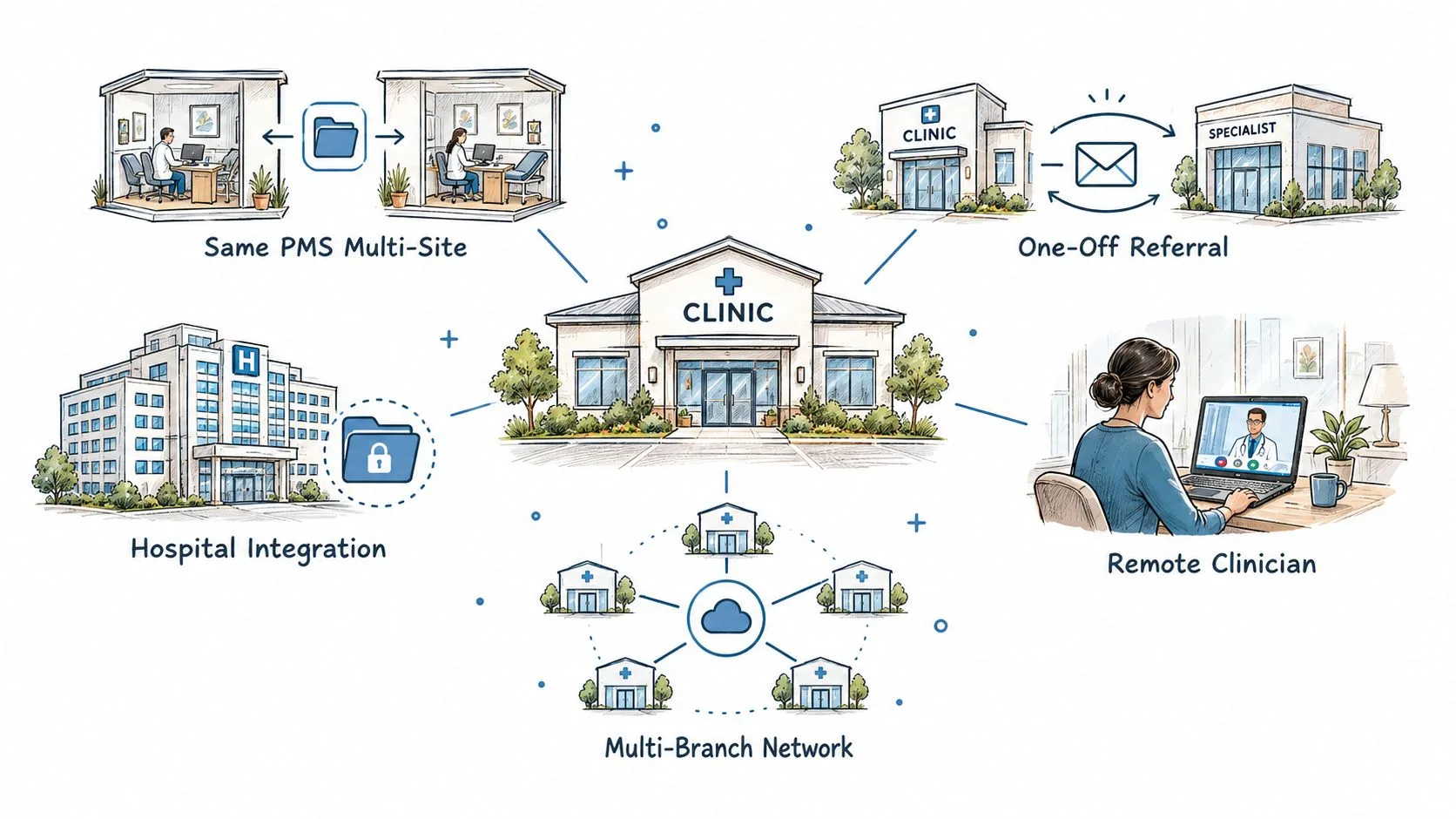
Automated multi-site transfer between practices using the same PMS should go to HIE or API-based exchange first. That gives you the cleanest routing into the patient record and the least chance of staff moving files by hand. If that's not available, use a controlled transfer service with named-recipient rules and expiry, then keep the manual step as short as possible.
One-off referrals between independent clinics are usually better served by a secure portal than by email. The portal gives you a real handoff point, which matters when the receiving clinic needs to verify access before downloading. If the specialist won't use a portal, fall back to encrypted email only when you've accepted the weaker audit and expiry story.
Large imaging or pathology file exchange should lean toward SFTP, HTTPS upload, or a managed transfer service that can handle bulk files without choking the workflow. Don't force these files through email just because the sender wants convenience. That's how people create shadow workflows that no one can audit properly later.
System-to-system integration with a hospital or HIE belongs with APIs. That's the cleanest way to preserve traceability and reduce human handling. It also avoids the duplicate filing problem that creeps in when a staff member downloads a file and then uploads it somewhere else.
Use the method that reaches the record with the fewest human touches.
The awkward fallback is the clinic that has no portal or API at all. In that case, use the most controlled secure-transfer option available, then make recipient verification and expiry essential. TOOLii's File Transfer capability fits best when you need automated clinic-to-clinic or clinic-to-many exchange without turning staff into manual dispatchers.
Compliance Checklist for Australian Health Data Transfers
The compliance question should be yes or no, not vague. If the answer is unclear, the workflow needs work.
- Encryption standards: Is patient data protected in transit, and is any stored copy encrypted too?
- Authentication: Does the recipient need a unique named login or verified identity?
- MFA: Is multi-factor authentication switched on for access?
- Audit logging: Can you see sender, recipient, file identifier, timestamp, and access events?
- Retention: Do you know how long the file and its logs are kept, and who can delete them?
- Breach response: Do staff know how to contain the transfer, assess harm, and escalate under the OAIC guidance?
- Patient consent: Where required, is consent documented before transmission?
- Vendor review: Have you checked the transfer provider's security posture and operating rules this year?
NSW Health recommends secure file-transfer tools for personal health information, ACT Health requires authorised disclosure and recipient verification, and WA Health requires confidential health information sent over the internet or public networks to be protected by encryption or another approved secure method (WA Health implementation guidance on security conformance). For clinics that also need to think about retention and archiving, Vigil Security's archiving and compliance playbook is a useful reference point for handling stored copies after transfer.
Do not use unencrypted email for identified clinical information without patient consent. That is the wrong default for Australian clinics, and the convenience argument doesn't outweigh the exposure.
Why Automation and Traceability Beat Protocol Snobbery
The biggest risk reduction usually comes from removing manual handling, not from chasing a fancier protocol. The Australian Digital Health Agency's 2025 interoperability survey covered 792 healthcare providers and 33 follow-up interviews, and it found that digital use for external information exchange has changed little since 2022 (ADHA interoperability survey). That tells me the bottleneck is still operational friction, not a shortage of encryption options.
For a multi-site clinic, I'd configure transfers around the patient record first. Map source and destination records, require named-recipient rules, switch on MFA, set expiry, and export the audit log in a format your practice manager can review. If the file can't land in the right patient context automatically, you're leaving too much room for misfiling and rework.
Automation matters because staff work around awkward systems. A secure method that people ignore is weaker in practice than a slightly less fancy method that fits the workflow and gets used every day. That's why I prefer secure automation with traceability over protocol loyalty.
If you're building a monitoring habit around file transfers, automation for onsite security monitoring is a useful parallel idea, because the same logic applies. You want repeated checks, clear logs, and a fast response path, not manual guesswork after the fact.
For clinics using TOOLii File Transfer, I'd treat rollout like any other clinical workflow change. Test the recipient, test the expiry, test the log export, then run a breach-response drill with staff who send and receive documents. If the workflow survives that test, it's ready. If it doesn't, no protocol label will rescue it.
Common Questions Australian Practice Managers Ask About File Transfer
How do I verify a recipient before releasing a referral?
Use named-recipient authentication and MFA, then confirm the recipient's clinic or system account before the file is released. If the method can't do that, it's too loose for patient documents.
What should I do when a file is too large for email?
Use a secure portal, SFTP, or a managed transfer service that supports large files and tracks delivery. Don't split the file into insecure chunks just to make email work.
How long should I keep audit logs?
Keep them according to your clinic's retention policy and legal advice, and make sure they're exportable for review. The key point is not the storage trick, it's whether the log proves who accessed the file and when.
What if the recipient clinic has no portal or API?
Use a controlled fallback with expiry, recipient verification, and audit logging. That's the point where a secure transfer service is more practical than trying to force email into a job it can't do well.
If you want to cut manual handling and move clinical files through a controlled, traceable workflow, TOOLii's File Transfer is built for that job across multi-site Australian clinics. See how it fits your practice flow at TOOLii, then compare it against the way your team sends referrals, scans, and imaging today.